> For the complete documentation index, see [llms.txt](https://guide.roundhr.com/llms.txt). Markdown versions of documentation pages are available by appending `.md` to page URLs; this page is available as [Markdown](https://guide.roundhr.com/setting/profile/notification.md).
# 알림 설정
알림 설정은 지원·면접·평가 등 각종 알림의 수신 시간·채널·유형을 개인에 맞게 켜고 끄며, 관리자가 역할별로 일괄 적용하는 기능입니다.
## 개요
**알림 설정**은 `[개인 설정] > [알림 설정]` 메뉴에서 나에게 전달되는 알림의 수신 시간·채널(이메일·문자·알림톡)·유형을 개인에 맞게 조정하는 기능입니다.
### 이런 경우에 사용하세요
* 업무 시간 외에는 알림을 받고 싶지 않을 때
* 면접·평가 등 특정 알림만 골라 이메일이나 문자로 받고 싶을 때
***
## 1. 알림 수신 시간 설정 [↗](https://app.roundhr.com/setting/personal/notification#notification_time)
알림을 받을 시간대를 설정합니다. 설정된 시간 외에는 알림이 전달되지 않으며, 미수신된 알림은 상단 알림 목록에서 확인할 수 있습니다.
* **하루종일 알림 받기:** 체크 시 24시간 알림 수신
* **시간 지정:** 체크 해제 후 시작/종료 시간을 30분 단위로 설정
***
## 2. 지원 완료 알림 [↗](https://app.roundhr.com/setting/personal/notification#notification_job)
{% hint style="info" %}
**관리자/매니저 전용 설정**
{% endhint %}
내가 담당한 공고에 **지원자가 홈페이지로 지원할 경우** 이메일 알림을 받을 수 있습니다.
* **이메일로 알림 받기:** 체크하면 지원 완료 시 이메일 수신
* Slack 등 협업툴을 연동했다면 협업툴 알림 설정에서 **지원 완료** 알림을 켜 협업툴 메시지로도 받을 수 있습니다. (기본 꺼짐)
***
## 3. 면접 일정 알림 [↗](https://app.roundhr.com/setting/personal/notification#notification_interview)
내가 담당한 공고의 **면접 일정 관련 알림**을 이메일 또는 문자/알림톡으로 받을 수 있습니다.
| 알림 유형 | 설명 |
| ---------- | -------------- |
| **면접일 확정** | 면접 일정이 확정되면 알림 |
| **면접일 변경** | 면접 일정이 변경되면 알림 |
| **면접 취소** | 면접이 취소되면 알림 |
각 알림 유형별로 **이메일** 또는 **문자/알림톡** 채널을 선택할 수 있습니다.
* 문자/알림톡 열 헤더를 클릭해 **문자** 또는 **알림톡** 중 원하는 채널을 선택하세요.
***
## 4. 평가(리뷰) 완료 알림 [↗](https://app.roundhr.com/setting/personal/notification#notification_feedback)
{% hint style="info" %}
**관리자/매니저 전용 설정**
{% endhint %}
내가 담당한 공고의 **평가(리뷰)가 완료될 경우** 이메일 알림을 받을 수 있습니다.
* **후보자 리뷰:** 후보자 리뷰 완료 시 알림
* **서류 평가:** 서류 평가 완료 시 알림
* **면접 & 과제 평가:** 면접 또는 과제 평가 완료 시 알림
***
## 5. 평가(리뷰) 알림 [↗](https://app.roundhr.com/setting/personal/notification#notification_member_feedback)
**평가(리뷰)를 요청받을 경우** 알림을 받을 수 있습니다.
* **이메일 리마인더 알림 받기:** 평가 요청 후 리마인더 이메일 수신
* **문자로 요청 알림 받기:** 평가 요청 시 문자(SMS) 수신
***
## 6. 면접 캘린더 초대 설정 [↗](https://app.roundhr.com/setting/personal/notification#notification_calendar)
면접 관련 캘린더의 초대 여부를 설정할 수 있습니다.
* **캘린더 초대 허용:** 체크 시 면접 일정이 내 캘린더에 자동 추가됨
***
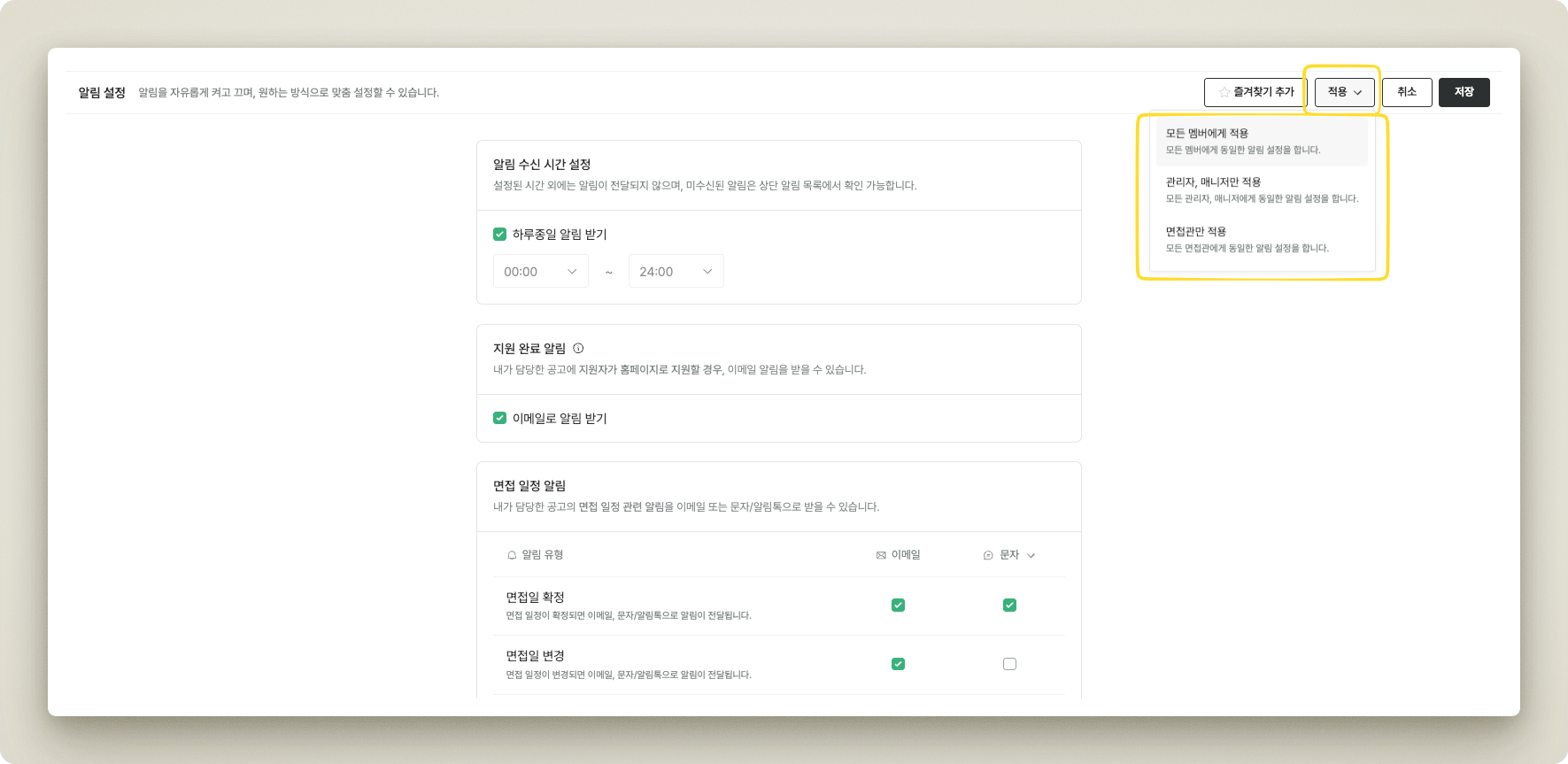
## 7. 일괄 설정 적용
관리자는 상단의 `[적용]` 버튼으로 특정 역할의 모든 멤버에게 동일한 알림 설정을 적용할 수 있습니다.
* **모든 멤버에게 적용:** 조직 내 모든 멤버에게 동일 설정
* **관리자, 매니저만 적용:** 관리자/매니저 역할에만 적용
* **면접관만 적용:** 면접관 역할에만 적용
알림 설정 일괄 적용
***
## 8. 협업툴 알림 설정 (Slack·Teams·네이버웍스)
조직에 [알림 연동](/setting/integrations/notifications.md)이 완료된 협업툴(Slack, Microsoft Teams, 네이버웍스)이 있으면, 알림 설정 페이지에 해당 협업툴의 알림 설정 카드(예: 슬랙 알림 설정)가 표시됩니다. 알림 유형별로 협업툴 메시지 수신 여부를 선택할 수 있으며, 여러 협업툴을 연동한 경우에도 카드는 한 개의 협업툴에 대해서만 표시됩니다.
* **알림 유형:** 지원(지원 완료), 지원자 커뮤니케이션, 평가, 면접, 라운드 폼, 자동화, 업무
* **지원 완료** 알림은 관리자/매니저에게만 표시되며, 기본적으로 꺼져 있습니다. 담당 공고에 지원자가 지원할 때 협업툴 알림을 받으려면 직접 켜 주세요.
{% hint style="info" %}
지원 완료 알림은 개인 알림과 별개로 Slack의 **운영 알림 채널**로도 전송할 수 있습니다. 설정 방법은 [Slack 연동](/setting/integrations/notifications/slack.md) 가이드를 참고하세요.
{% endhint %}
***
## 자주 묻는 질문
지원 완료·평가 완료 알림 설정이 제 화면에는 안 보여요.
`지원 완료 알림`과 `평가(리뷰) 완료 알림`은 관리자/매니저 전용 설정입니다. 면접관(멤버) 권한에서는 표시되지 않습니다.
설정한 수신 시간 외에 발생한 알림은 사라지나요?
아니요. 수신 시간 외에는 실시간으로 전달되지 않을 뿐, 미수신 알림은 화면 상단의 알림 목록에서 확인할 수 있습니다.
팀원 모두에게 같은 알림 설정을 적용하고 싶어요.
관리자는 상단 `[적용]` 버튼으로 모든 멤버·관리자/매니저·면접관 등 역할별로 동일한 알림 설정을 한 번에 적용할 수 있습니다.
지원 완료 슬랙 알림이 오지 않아요.
지원 완료 협업툴 알림은 기본적으로 꺼져 있습니다. `[개인 설정] > [알림 설정]`의 협업툴 알림 설정에서 **지원 완료**를 켰는지 확인해 주세요. 이 항목은 관리자/매니저에게만 표시되며, 설정한 알림 수신 시간 외에는 실시간으로 전달되지 않습니다.