> For the complete documentation index, see [llms.txt](https://guide.roundhr.com/llms.txt). Markdown versions of documentation pages are available by appending `.md` to page URLs; this page is available as [Markdown](https://guide.roundhr.com/setting/integrations/notifications/slack.md).
# Slack
Slack을 연동하면 면접 일정, 평가 요청, 서류 검토 등 채용 관련 알림을 Slack 봇으로 실시간으로 받을 수 있습니다. 특정 채널에 면접 알림을 보낼 수도 있습니다.
## 개요
Slack을 연동하면 채용 과정의 주요 이벤트(면접 일정, 평가 요청, 서류 검토 등)를 **Slack 봇 메시지**로 실시간 알림 받을 수 있습니다. 별도 앱 전환 없이 Slack에서 바로 채용 현황을 확인합니다.
### 핵심 이점
* **실시간 알림:** 면접 확정, 변경, 취소, 평가 요청 등을 Slack으로 즉시 확인합니다.
* **역할별 알림:** 면접관과 채용 관리자에게 각각 필요한 알림만 발송합니다.
* **채널 알림:** 특정 Slack 채널에 면접 관련 알림을 모아서 받을 수 있습니다.
## 사전 준비
* **권한:** 매니저 이상 (Slack 연동 설정은 매니저 이상만 가능하며, 면접관은 매니저가 연동한 뒤 알림을 수신만 할 수 있습니다.)
* **계정:** Slack 워크스페이스 필요
***
## 1. Slack 연동하기
***
* **서비스 연동** > **알림**에서 `[Slack]`을 클릭합니다.
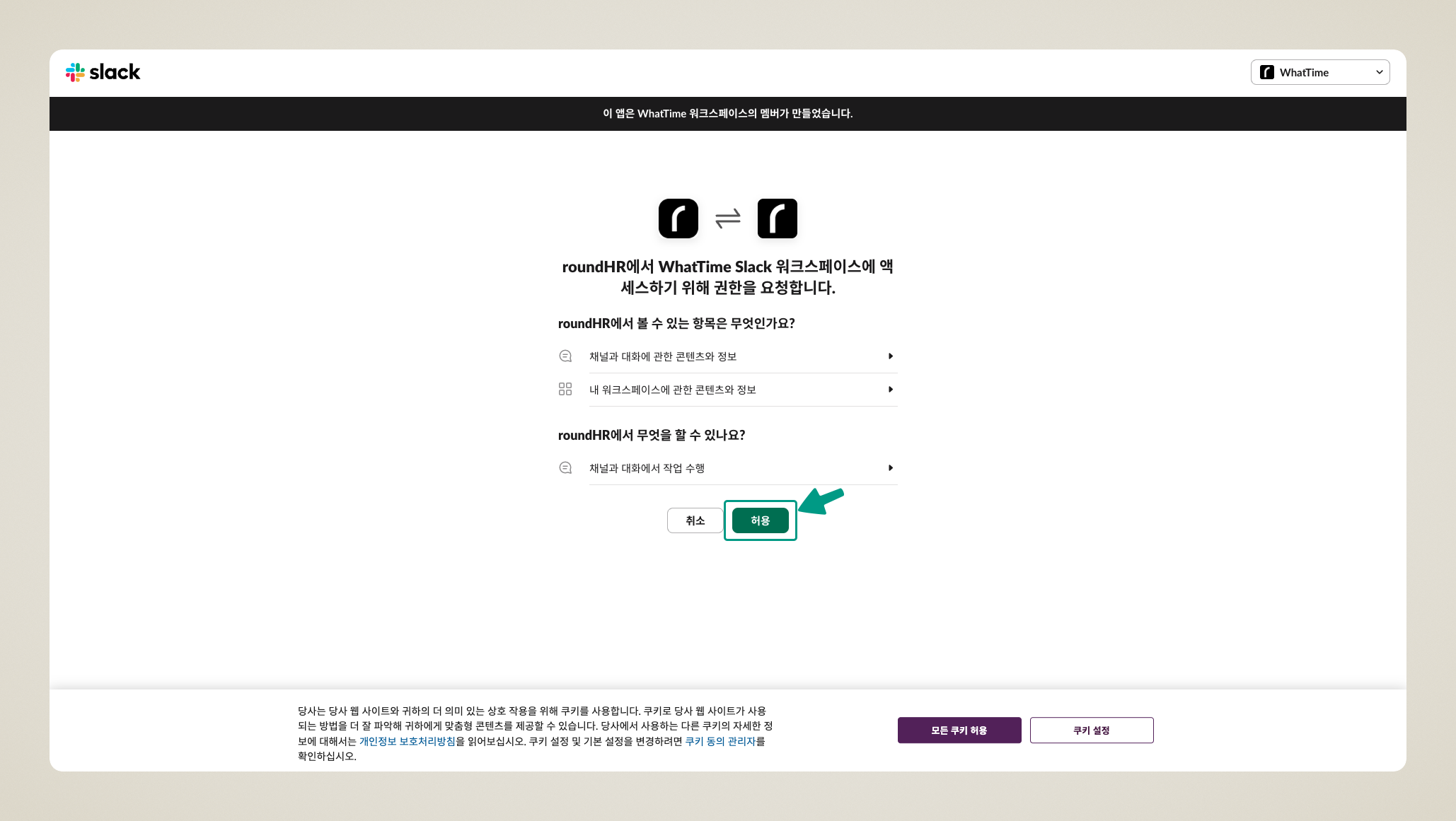
* `[연동하기]`를 클릭하고 Slack 계정으로 로그인합니다.
* 워크스페이스를 생성하거나 기존 워크스페이스를 연결하여 사용합니다.
Slack 연동 진입
워크스페이스 연결
***
## 2. Slack으로 발송되는 알림 종류
***
### 면접관에게 발송되는 알림
| 알림 유형 | 세부 내용 |
| --------- | ------------------------------- |
| **서류 검토** | 서류 검토 요청 알림 |
| **면접 일정** | 가능한 시간 선택 요청, 일정 확정/변경/취소, 리마인더 |
| **면접 평가** | 평가 요청, 재요청, 미완료 리마인더 |
| **기타** | 과제 평가 요청, 팀 채팅 멘션, 자동화 승인 요청 |
### 채용 관리자/매니저에게 발송되는 알림
| 알림 유형 | 세부 내용 |
| --------- | ------------------------------------------------------------------ |
| **지원** | 지원 완료 알림 ([알림 설정](/setting/profile/notification.md)에서 켠 경우, 기본 꺼짐) |
| **면접 일정** | 면접관 시간 확정/실패, 지원자 시간 선택/실패, 일정 확정/변경/취소, 리마인더 |
| **평가** | 서류 평가 완료 알림 (1시간 기준), **면접 평가 완료 알림** |
| **폼** | **라운드폼 제출 완료 알림** |
| **기타** | 지원자 메시지 알림, 팀 채팅 멘션, 자동화 승인 요청, 업무 리마인더 |
{% hint style="info" %}
**공고 멤버**에게는 공고 관련 알림이 전송되지 않습니다.
{% endhint %}
***
## 3. 특정 채널로 알림 모아 받기
***
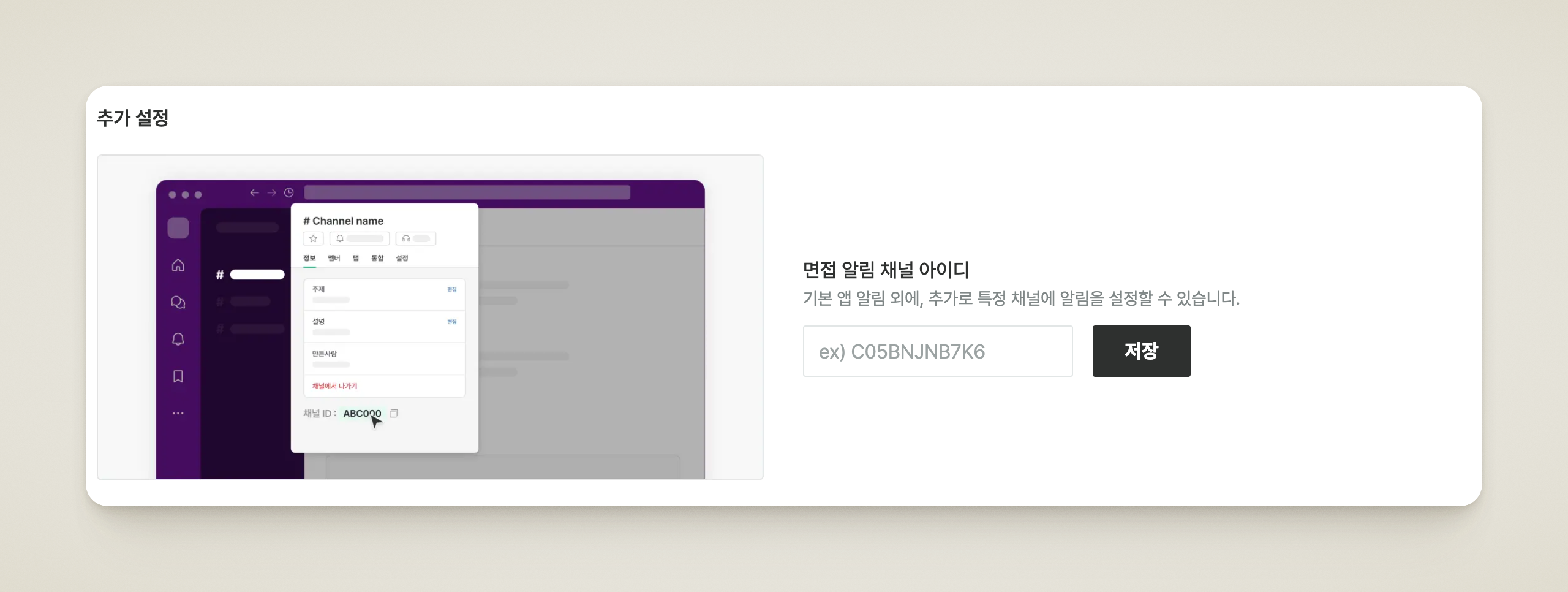
Slack 연동 후 `[추가 설정]` 화면에서 채널 아이디를 입력하면, 개인 알림과 별개로 특정 채널에 알림을 모아 받을 수 있습니다.
| 설정 | 발송되는 알림 |
| ---------------- | ----------------------------------------------------- |
| **면접 알림 채널 아이디** | 면접 관련 알림 |
| **운영 알림 채널 아이디** | 지원 완료, 평가 완료, 지원자 채팅 메시지, 지원자 이메일 수신, 폼 제출 완료 등 운영 알림 |
* Slack 채널 아이디(예: `C05BNJNB7K6`)를 입력하고 저장하면 해당 채널로 알림이 발송됩니다.
* 채널로 전송되는 알림은 개인 알림 설정과 무관하게 발송됩니다.
알림 채널 설정
{% hint style="warning" %}
Slack **비공개 채널**에 연동하는 경우 **@roundHR**을 해당 채널에 초대해야 알림을 받을 수 있습니다.
{% endhint %}
***
## 자주 묻는 질문
Slack 알림을 특정 알림만 받도록 설정할 수 있나요?
현재 Slack 알림은 역할에 따라 자동으로 발송됩니다. 개별 알림의 ON/OFF는 라운드HR의 [알림 설정](/setting/profile/notification.md)에서 관리할 수 있습니다.
Slack 연동을 해제하면 어떻게 되나요?
Slack 연동을 해제하면 더 이상 Slack으로 알림이 발송되지 않습니다. 라운드HR 내 알림 및 이메일 알림은 별도로 유지됩니다.
비공개 채널로 설정했는데 알림이 오지 않아요.
Slack 비공개 채널에 연동하는 경우 해당 채널에 @roundHR을 초대해야 알림을 받을 수 있습니다. 채널에 봇을 초대한 뒤 다시 확인해 주세요.
지원 완료 알림을 팀 채널로 받을 수 있나요?
네. `[추가 설정]`의 **운영 알림 채널 아이디**에 채널 아이디를 입력하면 지원 완료를 포함한 운영 알림이 해당 채널로 발송됩니다. 채널 알림은 개인 알림 설정과 무관하게 발송되며, 개인적으로 받으려면 [알림 설정](/setting/profile/notification.md)의 협업툴 알림 설정에서 **지원 완료**를 켜 주세요.
![서비스 연동 > 알림에서 Slack의 [연동하기] 버튼](https://3113620308-files.gitbook.io/~/files/v0/b/gitbook-x-prod.appspot.com/o/spaces%2Fx3vbe9mozK3C5425TCxL%2Fuploads%2Fgit-blob-426b8bdd893c038fc3921c3cb62ebf4062030d71%2Fset_integ_services_slack_s1_01.png?alt=media)