> For the complete documentation index, see [llms.txt](https://guide.roundhr.com/llms.txt). Markdown versions of documentation pages are available by appending `.md` to page URLs; this page is available as [Markdown](https://guide.roundhr.com/setting/integrations/notifications/naver_works.md).
# Naver Works
Naver Works 알림 연동은 네이버웍스 봇을 생성·등록해 면접·평가·업무 알림을 네이버웍스로 받아볼 수 있게 하는 설정입니다.
## 개요
**Naver Works 알림 연동**은 네이버웍스 봇을 생성·등록해 면접·평가·업무 관련 알림을 네이버웍스로 받아볼 수 있게 하는 설정입니다.
### 이런 경우에 사용하세요
* 사내 협업 도구로 네이버웍스를 쓰며, 채용 알림도 네이버웍스로 받고 싶을 때
## 사전 준비
네이버웍스 알림 연동을 위해서는 네이버웍스 앱이 먼저 연동되어 있어야 합니다.
{% hint style="info" %}
캘린더 연동 시 이미 앱을 설정했다면 앱 생성은 필요하지 않습니다. [네이버웍스 캘린더 연동 가이드](/setting/integrations/calendar/naver-works.md)를 참고하세요.
{% endhint %}
***
## 1. 봇 생성
[네이버 웍스 개발자 센터](https://dev.worksmobile.com/)에서 봇을 생성합니다.
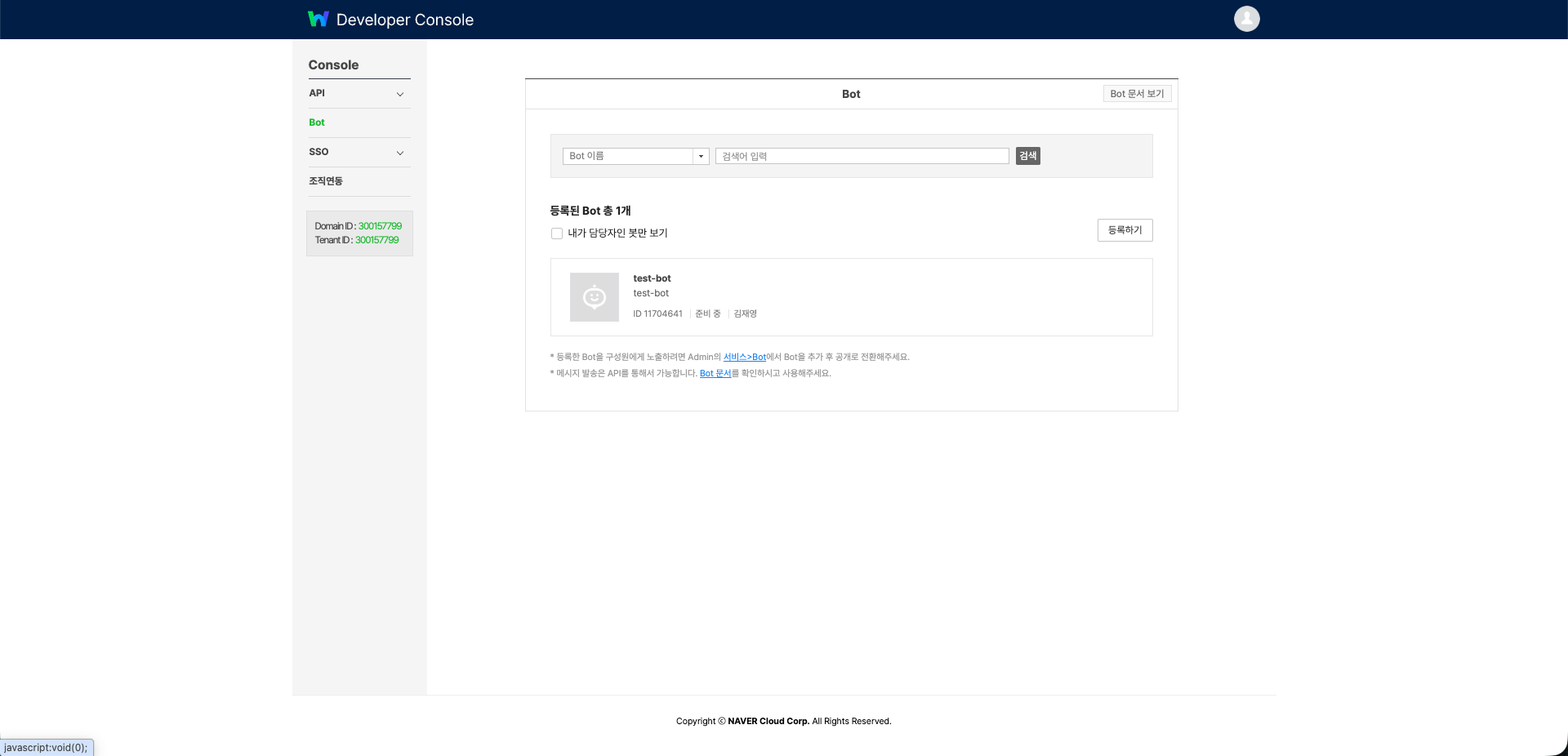
1. Developer Console > **Bot** 메뉴 > `[등록하기]`를 클릭합니다.
2. 아래 내용을 입력합니다.
* **Bot 이름**: 라운드HR 알림
* **Bot 설명**: 면접 일정 및 업무 알림
* **Callback URL**: Off
* **담당자**: 관리자 계정 선택
3. `[저장]`을 클릭하면 **Bot ID**가 발급됩니다.
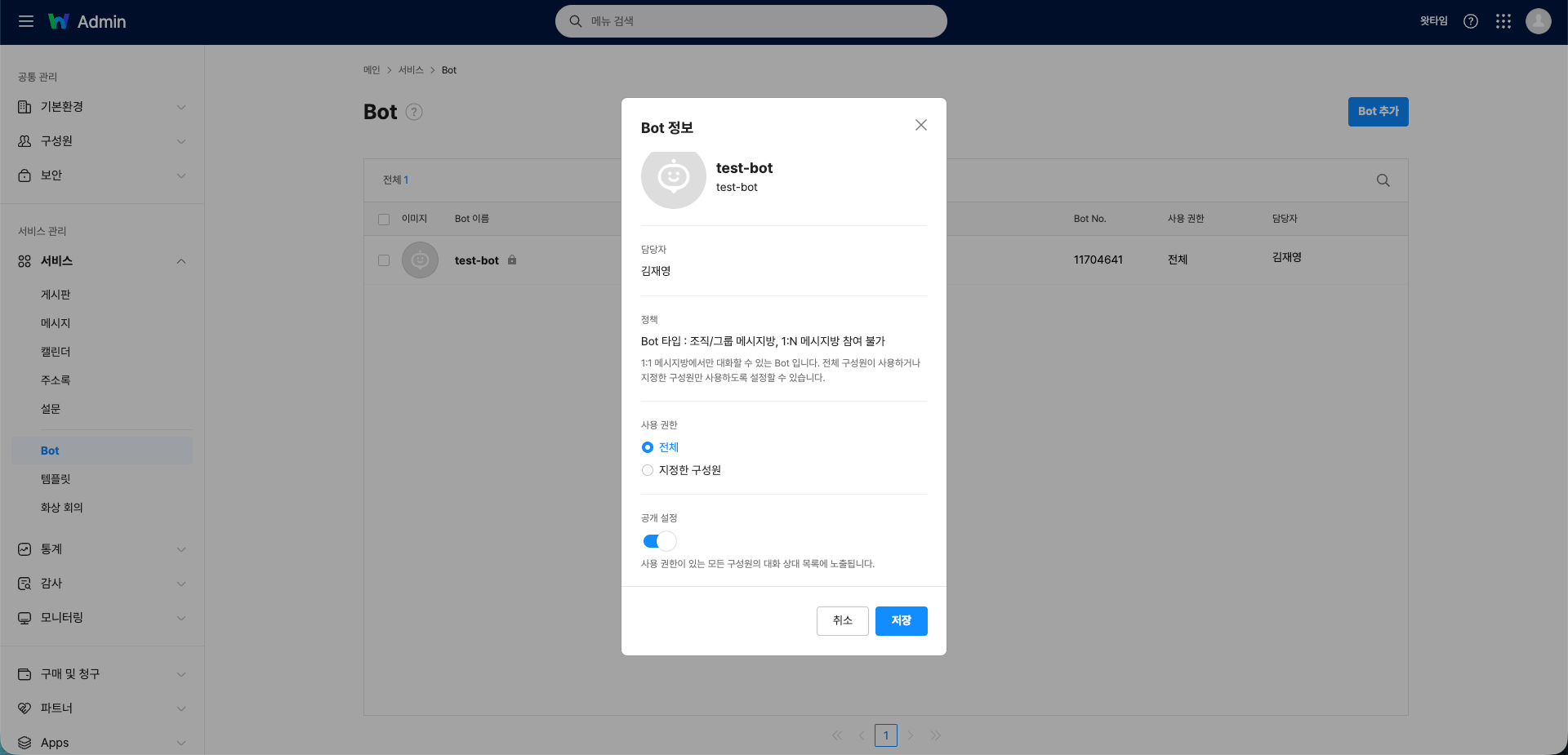
3. 추가된 봇을 클릭해 **사용 권한**을 **전체**로, **공개 설정**을 **ON**으로 변경한 뒤 `[저장]`합니다.
봇 권한 설정
***
## 3. Service Account 발급
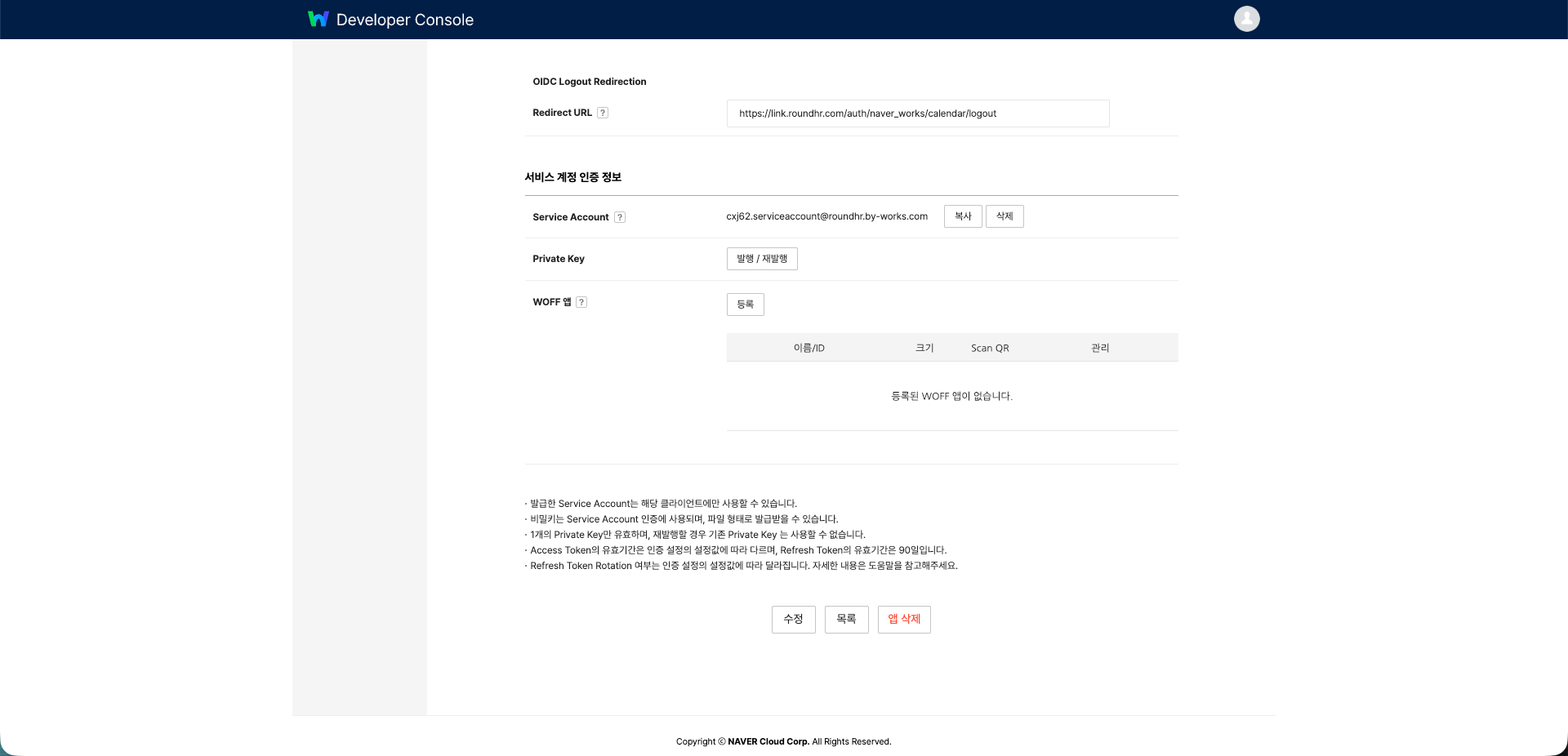
1. Developer Console > API > **ClientApp** > 앱을 선택합니다.
2. 서비스 계정 인증 정보에서 Service Account `[발급]`을 클릭합니다.
3. Service Account ID를 확인하고 `[복사]`합니다.
4. Private Key `[발행 / 재발행]`을 클릭해 `.key` 파일을 다운로드합니다.
Service Account 발급
{% hint style="warning" %}
Private Key는 1개만 유효합니다. 재발행하면 기존 키는 사용할 수 없습니다.
{% endhint %}
***
## 4. 라운드HR에서 봇 정보 입력
* 서비스 연동 > 알림에서 네이버웍스를 클릭합니다.
* 아래 정보를 입력하고 `[저장]`합니다.
| 입력 항목 | 값 |
| ---------------------- | ------------------------------ |
| **Bot ID** | 봇 등록 후 발급된 정수값 (예: 11704641) |
| **Service Account ID** | `xxxxx@example.serviceaccount` |
| **Private Key** | 다운로드한 `.key` 파일의 전체 내용 |
{% hint style="info" %}
봇 정보가 저장되면 조직 내 구성원 정보가 자동으로 동기화됩니다. 개별 구성원이 별도로 연동할 필요 없이 바로 알림이 발송됩니다.
{% endhint %}
***
## 5. 네이버웍스로 발송되는 알림 종류
### 1) 면접관에게 발송되는 알림
면접관이 확인해야 하는 정보를 네이버웍스 봇으로 발송합니다.
* 서류 검토 요청 알림
* 면접 일정
* 면접 가능한 시간 선택 요청
* 면접 일정 확정, 변경, 취소, 리마인더
* 면접 평가
* 평가 요청 / 재요청
* 평가 미완료 시 리마인더
* 과제 평가 요청
* 팀 채팅 멘션
* 자동화 승인 요청
### 2) 채용 관리자/매니저에게 발송되는 알림
채용 관리자·매니저가 바로 확인이 필요한 알림을 네이버웍스 봇으로 발송합니다. (공고 멤버에게는 공고 관련 알림을 전송하지 않습니다.)
* 면접 일정
* 면접관 시간 확정 실패
* 면접관 시간 확정 완료
* 후보자 가능한 시간 없음
* 후보자 시간 선택 확정
* 면접 일정 확정, 변경, 취소, 리마인더
* 지원자가 메시지 보낼 때 알림
* 평가 완료 알림
* 서류 평가 알림 (1시간 기준)
* 팀 채팅 멘션
* 자동화 승인 요청
* 업무 리마인더
***
## 자주 묻는 질문
캘린더 연동을 이미 했는데 봇용 앱을 또 만들어야 하나요?
캘린더 연동 시 이미 네이버웍스 앱을 설정했다면 앱을 새로 만들 필요는 없습니다. 기존 앱을 사용해 봇만 생성·등록하면 됩니다.
Private Key를 재발행하면 어떻게 되나요?
Private Key는 1개만 유효합니다. 재발행하면 기존 키는 즉시 무효가 되므로, 재발행한 경우 라운드HR에 새 키를 다시 입력해야 합니다.
구성원마다 각자 연동해야 하나요?
아니요. 봇 정보가 저장되면 조직 구성원 정보가 자동으로 동기화되어, 개별 연동 없이 바로 알림이 발송됩니다.
![네이버웍스 Admin의 서비스 > Bot에서 [Bot 추가]를 클릭하는 화면](https://3113620308-files.gitbook.io/~/files/v0/b/gitbook-x-prod.appspot.com/o/spaces%2Fx3vbe9mozK3C5425TCxL%2Fuploads%2Fgit-blob-127853cd78724b48a5aa95a63b1c026ee37fbbb6%2Fset_integ_noti_naver-works_s2_01.png?alt=media)