> For the complete documentation index, see [llms.txt](https://guide.roundhr.com/llms.txt). Markdown versions of documentation pages are available by appending `.md` to page URLs; this page is available as [Markdown](https://guide.roundhr.com/candidate/detail_info/teamchat.md).
# 팀채팅
지원자에 대해 팀원들과 메모를 남기거나 채팅을 할 수 있습니다. 열람 권한 설정, 파일 공유, 멘션 기능을 활용하여 효율적으로 소통하세요.
## 개요
지원자 상세 화면의 **팀채팅** 탭에서는 해당 지원자에 대해 팀원들과 내부 소통을 할 수 있습니다. 열람 권한을 설정하여 특정 멤버만 확인할 수 있도록 관리하고, 파일 공유와 멘션 기능으로 효율적인 협업이 가능합니다.
### 핵심 이점
* 지원자별 전용 채팅 공간으로 맥락을 유지하며 소통
* 열람 권한 설정으로 민감한 논의를 안전하게 관리
* 파일 공유와 멘션 기능으로 빠르고 정확한 정보 전달
***
## 사전 준비
* **공고 멤버** 이상 권한이 필요합니다.
* 권한에 대한 자세한 내용은 [권한 설정](/setting/permissions.md)을 참고하세요.
***
## 1. 팀채팅 사용
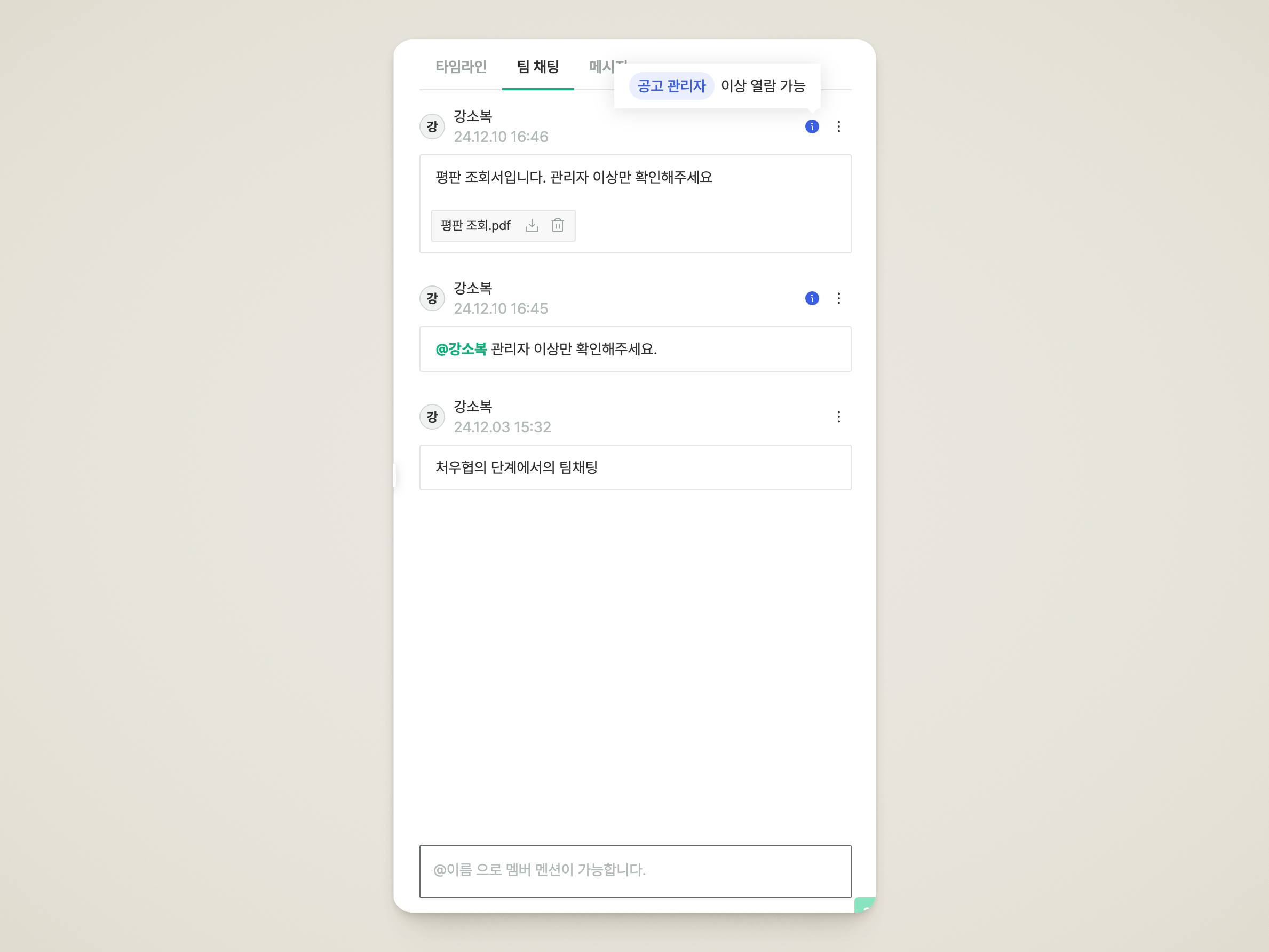
* 지원자에 대해 공유할 내용을 기록할 수 있는 영역입니다.
* 열람 권한을 설정하여 채팅을 할 수도 있습니다.
* **@멘션**으로 특정 팀원에게 알림을 보낼 수 있습니다.
{% hint style="info" %}
지원자와 관련된 파일에 열람 권한을 부여하여 등록할 수 있습니다.
{% endhint %}
팀 채팅 탭
***
## 자주 묻는 질문
팀채팅 내용은 지원자에게 보이나요?
아니요, 팀채팅은 **내부 팀원 간의 소통 공간**입니다. 지원자에게는 팀채팅 내용이 노출되지 않으므로 자유롭게 의견을 나눌 수 있습니다.
열람 권한은 어떻게 설정하나요?
채팅 작성 시 열람 권한을 설정할 수 있습니다. 특정 멤버만 해당 메시지를 확인할 수 있도록 제한하여 민감한 논의를 안전하게 관리할 수 있습니다.
특정 팀원에게 알림을 보내거나 파일을 공유할 수 있나요?
**@멘션**으로 특정 팀원을 지정하면 해당 팀원에게 알림이 전달됩니다. 또한 지원자와 관련된 파일을 열람 권한과 함께 팀채팅에 등록해 공유할 수 있습니다.